Authentication
The Pickware ERP API is available on the Professional and Enterprise plans, currently as the 2026-06-unstable early-access preview whose schema may still change before the first stable version. If you need help getting started, contact Pickware support.
Authorizing a request against the Pickware ERP API takes two steps:
- Create a token in the administration. You receive an access key and a secret access key — a long-lived credential pair that identifies your application and carries its access scopes.
- Exchange that credential pair for an access token, then send the access token as a bearer token on every API request.
The credential pair is only ever sent to the token endpoint, never to the GraphQL endpoint. Access tokens are short-lived, so a long-running client repeats the exchange as they expire.
Creating a token
Tokens are managed from the Pickware ERP administration under Settings → GraphQL API tokens. The first time you open the page it is empty and prompts you to spin up a token for the current schema:
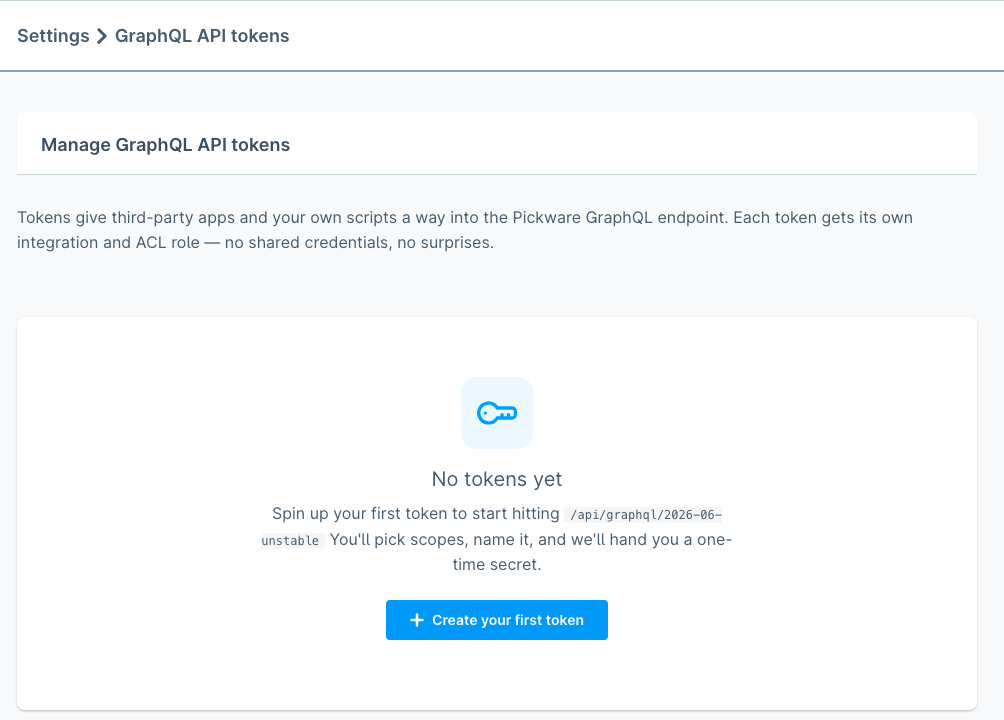
Press Create your first token (or + Create token in the page header once you already have at least one) to open the create form. Pick a descriptive name and set the Access scopes for each resource your application needs. Every scope can be set to None, Read, or Write; Write implies Read. Pick the minimum set required — additional scopes can always be added later.
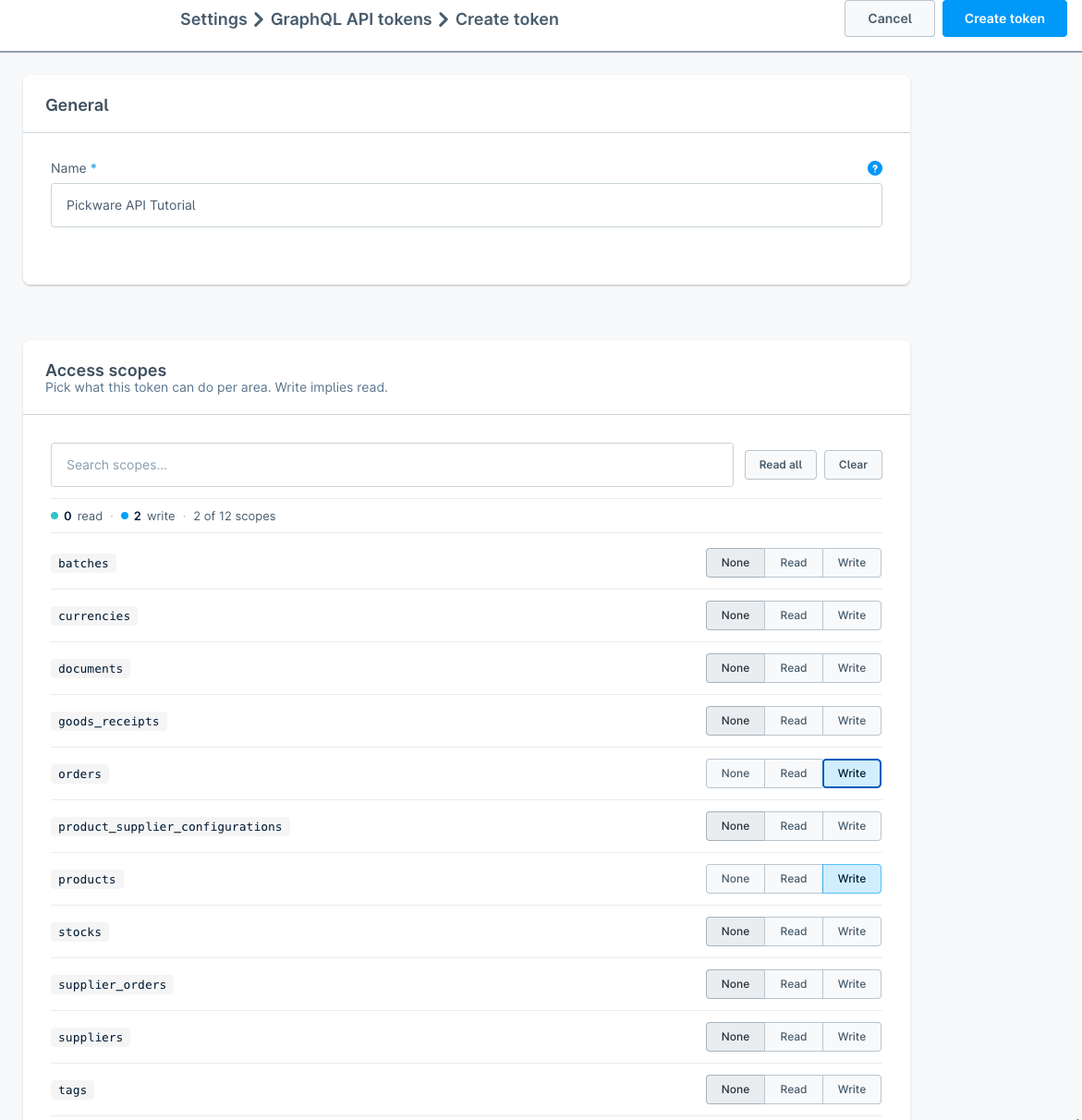
Press Create token. Pickware ERP returns the access key and a one-time secret:
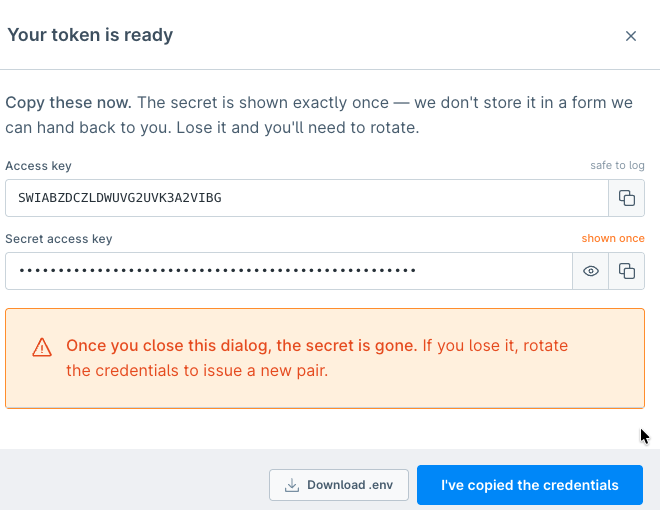
The access key is safe to log; the secret access key is shown exactly once. Copy both before closing the dialog — or use Download .env to save them as PICKWARE_GRAPHQL_ACCESS_KEY and PICKWARE_GRAPHQL_SECRET_ACCESS_KEY. If the secret is lost, rotate the credentials from the token's detail page to issue a new pair.
Authorizing requests
Exchange the credential pair for an access token with a POST to the token endpoint. The exchange uses the OAuth 2.0 client credentials grant: the access key is the client_id, the secret access key is the client_secret.
curl https://<your-pickware-api-domain>/api/oauth/token \
  --request POST \
  --header "Content-Type: application/json" \
  --data "{
    \"grant_type\": \"client_credentials\",
    \"client_id\": \"$PICKWARE_GRAPHQL_ACCESS_KEY\",
    \"client_secret\": \"$PICKWARE_GRAPHQL_SECRET_ACCESS_KEY\"
  }"
A successful exchange returns the access token together with its remaining lifetime in seconds:
{
  "token_type": "Bearer",
  "expires_in": 600,
  "access_token": "<access-token>"
}
Send the access_token value in the Authorization header of every GraphQL request:
Authorization: Bearer <access_token>
Access token lifetime
Access tokens are short-lived — currently 10 minutes. Treat the expires_in value from the response as the source of truth rather than hard-coding a duration.
The client credentials grant does not issue a refresh token. To continue once an access token has expired, repeat the exchange with the same access key and secret access key: both stay valid until you rotate or delete the token.
Cache the access token for its lifetime instead of exchanging a new one per request, and renew it shortly before it expires so a long-running job does not race the expiry. Requests made with a missing or expired access token fail with an UNAUTHENTICATED error.
Token scopes
Tokens should be scoped to the minimum access required by your application. The generated reference documents required scopes with the requiresScopes directive.
| Scope | Description |
|---|---|
products:read | Read products and variants. |
stocks:read / stocks:write | Read stock, set stock, adjust stock, and transfer stock. |
warehouses:read / warehouses:write | Read and maintain warehouses and bin locations. |
supplier_orders:read / supplier_orders:write | Read and manage supplier orders and supplier order line items. |
product_supplier_configurations:read / product_supplier_configurations:write | Read and maintain product-supplier assignments. |
goods_receipts:read / goods_receipts:write | Read, create, approve, complete, and delete goods receipts. |
orders:read / orders:write | Read orders and trigger complete shipment workflows. |
Failed authentication
Requests without a valid access token receive a GraphQL error with an UNAUTHENTICATED code. See Errors for the response format and retry guidance.